

VS Code Usage
How to run and debug Monty via Visual Studio Code
This guide will enable you to develop with Monty using VS Code on any supported platform.
1. Setup
-
Complete the Getting Started tutorial.
-
Install Visual Studio Code: https://code.visualstudio.com/download
-
Install the Python extension: https://marketplace.visualstudio.com/items?itemName=ms-python.python
-
Install the Ruff extension: https://marketplace.visualstudio.com/items?itemName=charliermarsh.ruff
-
Initialize the settings file using the provided example:
cp ~/tbp/tbp.monty/.vscode/settings.example.json ~/tbp/tbp.monty/.vscode/settings.json -
Then, launch VS Code with Monty:
cd ~/tbp/tbp.monty && code .
2. Run and Debug
You can create a run configuration to debug experiments and benchmarks.
- In the top menu, select:
- Run > Add Configuration
- Python Debugger
- Python File with Arguments
- Change the
"name"and"program"values to"run.py" - Optionally, change the
"args"value to an experiment or benchmark of your choice, e.g."experiment=randrot_noise_10distinctobj_surf_agent", or leave the default value if you want a popup box on every run to manually specify the arguments. - In the top menu, select: View > Run
- In the bottom left, under "Breakpoints", enable "User Uncaught Exceptions"
- Launch it by selecting in the top menu: Run > Start Debugging
- Use the debug controls at the top as needed.
Multiple configurations can be created for different experiments and benchmarks.
To pass custom environment variables to Python when running via VS Code, you can create a .env file in ~/tbp/tbp.monty containing those variables, one per line (e.g. WANDB_MODE=offline).
3. Unit Tests
The unit tests can be run directly in VS Code:
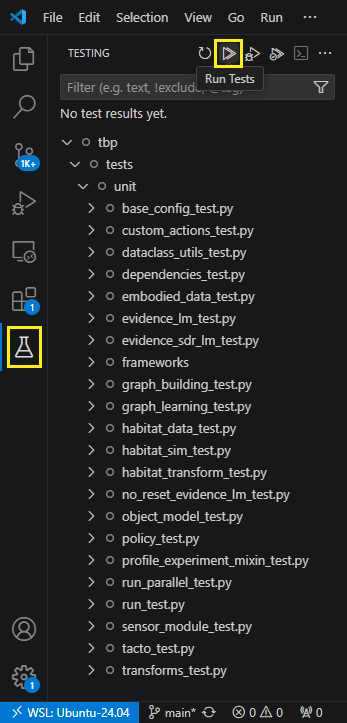
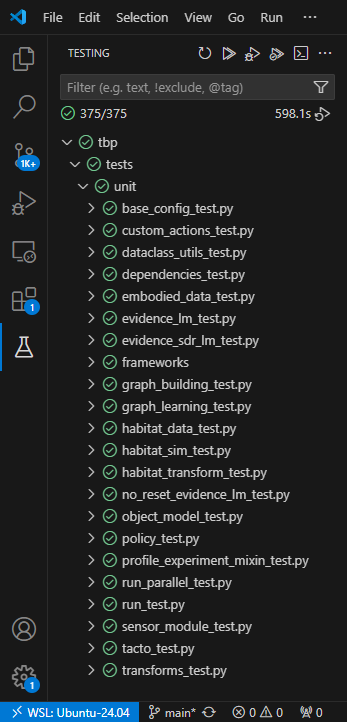
This will take some time, about 10 minutes on an 8-core CPU for example:
Help Us Make This Page Better
All our docs are open-source. If something is wrong or unclear, submit a PR to fix it!
Updated about 5 hours ago